Sales Configuration Guide
A comprehensive guide to setting up automated daily token sales, managing your sales configurations, and understanding the sales execution process on TradePoint.
1. Introduction
The Sales Configuration feature allows you to automate the process of selling your tokens on a daily basis. Instead of manually selling tokens each day, you set up a configuration that tells the platform how many tokens to sell automatically.
What You Can Do
- Set Daily Sales - Configure how many tokens to sell each day
- Set Limits - Optional maximum total tokens to sell
- Set Expiration - Optional end date for sales
- Start/Stop Anytime - Control when sales are active
- Track Progress - View your sales history and execution
- Multiple Tokens - Configure different sales for different tokens
[!IMPORTANT] Sales configurations are automated but not guaranteed. The platform attempts to sell your configured amount daily, but actual sales depend on market conditions, liquidity, and platform operations.
2. What is Sales Configuration?
Definition
A sales configuration is an automated instruction you give to the platform to sell a specific amount of tokens daily on your behalf. Think of it as a “sell order” that repeats every day.
How It Works
┌────────────────────────────────────────────────────────────────┐
│                                                                │
│  You Configure:  "Sell 1,000 USDT per day"                     │
│                                                                │
│  Platform Does:  Every day before cut-off time,                │
│                  attempts to sell up to 1,000 USDT             │
│                                                                │
│  Result:         Tokens sold → Funds added to your balance     │
│                                                                │
└────────────────────────────────────────────────────────────────┘
When to Use Sales Configuration
Good Use Cases:
Dollar-Cost Averaging (DCA) Out
- Gradually sell tokens over time
- Reduce impact of market volatility
- Spread sales across multiple days/weeks
Automated Portfolio Management
- Set it and forget it approach
- No need to monitor daily
- Consistent selling schedule
Limit Exposure
- Systematically reduce holdings
- Manage risk by regular selling
- Avoid emotional trading decisions
Liquidity Planning
- Generate regular cash flow
- Plan for known expenses
- Predictable selling schedule
What Sales Configuration Is NOT
❌ Not a Market Order - Sales are processed by platform operations, not instant market orders
❌ Not Guaranteed - Actual sales may be lower than configured amount due to market conditions
❌ Not Price-Protected - You don’t control the sale price; platform determines execution price
❌ Not Instant - Sales are processed once daily at a specific cut-off time
3. Understanding the Sales Process
Daily Sales Lifecycle
┌────────────────────────────────────────────────────────────────┐
│                                                                │
│  Day 1                Day 2                Day 3               │
│  Morning          →   Morning          →   Morning             │
│  ────────────────────────────────────────────────────────      │
│                                                                │
│  Platform checks      Platform checks      Platform checks     │
│  your config         your config         your config           │
│  │                    │                    │                   │
│  ▼                    ▼                    ▼                   │
│  Attempts to sell    Attempts to sell    Attempts to sell      │
│  1,000 USDT          1,000 USDT          1,000 USDT            │
│  │                    │                    │                   │
│  ▼                    ▼                    ▼                   │
│  Executes sale       Executes sale       Executes sale         │
│  Records in history  Records in history  Records in history    │
│                                                                │
└────────────────────────────────────────────────────────────────┘
Key Concepts
Daily Amount
- The target amount of tokens to sell each day
- This is the maximum, not the minimum
- Actual sales may be less depending on conditions
Example:
Daily Amount: 1,000 USDT

Possible Outcomes:
✓ Day 1: Sold 1,000 USDT (full amount)
✓ Day 2: Sold 800 USDT (partial - market conditions)
✓ Day 3: Sold 1,000 USDT (full amount)
✓ Day 4: Sold 500 USDT (partial - liquidity constraints)
Max Token Limit (Optional)
- Total maximum tokens to sell across all days
- When reached, sales stop automatically
- Configuration status changes to “completed”
Example:
Daily Amount: 1,000 USDT
Max Token Limit: 10,000 USDT

Timeline:
Day 1-9: Sells 1,000 USDT each day = 9,000 USDT total
Day 10: Sells 1,000 USDT = 10,000 USDT total
Day 11: STOPS - max limit reached, status = "completed"
Expiration Date (Optional)
- Date when sales should stop
- Sales automatically stop on this date
- Configuration status changes to “expired”
Example:
Daily Amount: 1,000 USDT
Expiration Date: March 31, 2025

Timeline:
March 1-30: Sells 1,000 USDT daily
March 31: Last day of sales
April 1: STOPS - expired, status = "expired"
Configuration Limits
[!WARNING] One Configuration Per Token: You can only have ONE active or stopped configuration per token at a time. You cannot have multiple sales configs for the same token running simultaneously.
What This Means:
- ✅ Configure USDT: 1,000 per day
- ✅ Configure ETH: 0.5 per day
- ❌ Cannot have two USDT configs (e.g., 500 morning + 500 evening)
To Change:
- Stop or remove the existing configuration
- Create a new configuration with different settings
4. Before You Start
Requirements
1. Available Token Balance
- You must have tokens in your portfolio
- Tokens must be unlocked and available
- Minimum amount requirements may apply per token
2. No Existing Configuration
- Only one configuration per token allowed
- Stop or remove existing configs before creating new ones
3. Platform Access
- Sales Config feature must be enabled for your account
- Check with admin if you don’t see the Sales Config page
Understanding Your Token Balance
When setting up sales, you’ll see three balance types:
Available Balance
- Tokens that are unlocked and ready to sell
- This is what you can configure for sales
- Excludes locked, vesting, or reserved tokens
Locked Balance
- Tokens that cannot be sold yet
- May be vesting, staked, or otherwise restricted
Total Balance
- Available + Locked
- Your complete token holdings
Example Display:
┌─────────────────────────────────────────┐
│  USDT (Tether)                          │
│                                         │
│  Available: 50,000 USDT                 │
│  Locked: 10,000 USDT                    │
│  Total: 60,000 USDT                     │
│                                         │
│  You can configure sales up to          │
│  50,000 USDT (available balance)        │
└─────────────────────────────────────────┘
Minimum Amount Requirements
Some tokens may have minimum daily amounts to ensure efficient sales execution.
Example:
Token: USDT
Minimum Daily Amount: 100 USDT

✓ Valid: 1,000 USDT per day
✓ Valid: 150 USDT per day
✓ Valid: 100 USDT per day
✗ Invalid: 50 USDT per day (below minimum)
The platform will show the minimum amount when you’re configuring sales.
5. Creating a Sales Configuration
Follow this 4-step wizard to create your sales configuration.
Accessing Sales Configuration
- Log into your TradePoint account
- From the main menu, click “Sales Config”
- The Sales Configuration page opens
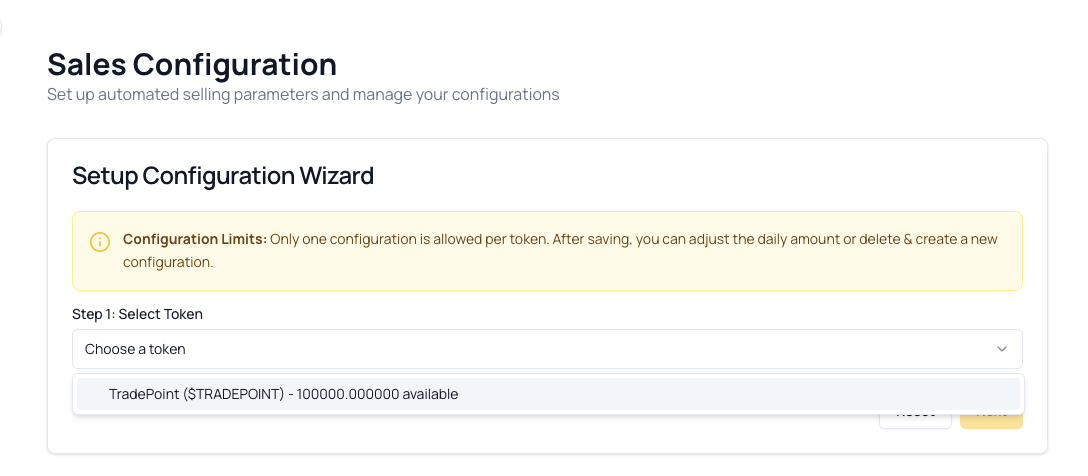
Step 1: Select Token
What You’ll See:
What To Do:
- Click the dropdown to see available tokens
- Review your balances shown for each token
- Select the token you want to sell
Tokens Not Showing?
- You may not have any available token balance
- Token may already have an active configuration
- Check your portfolio to verify token holdings
[!TIP] Choose tokens with sufficient available balance to sustain your planned daily sales over your desired time period.
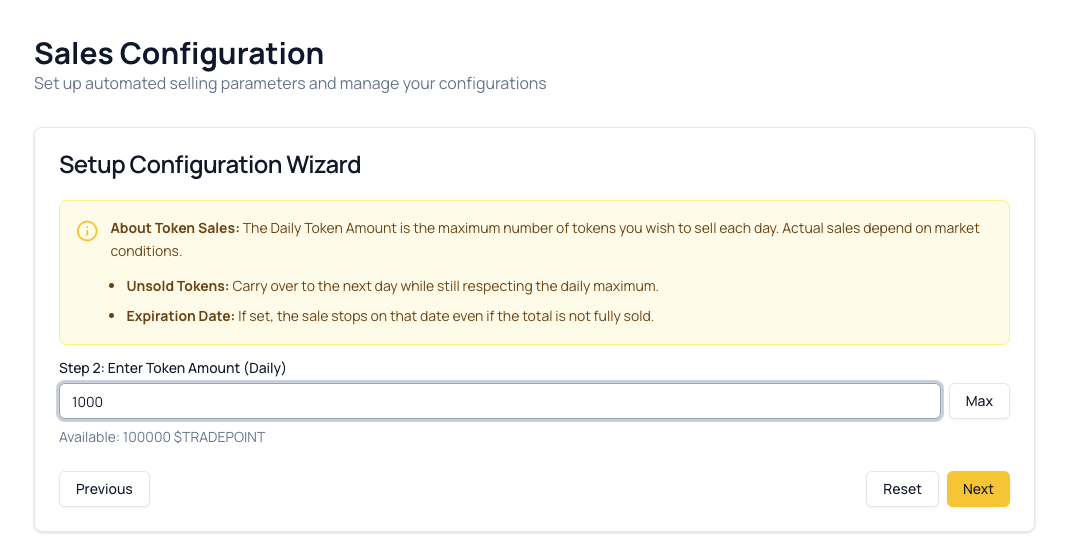
Step 2: Enter Daily Token Amount
What You’ll See:
What To Do:
- Enter your desired daily amount
- Type the number of tokens
- Use decimals if needed (e.g., 1,500.50)
- Platform limits decimals based on token (usually 2-6 places)
- Click “MAX” button (optional)
- Automatically fills in your full available balance
- Useful if selling all tokens over time
- Verify your amount
- Above minimum required amount
- Below or equal to available balance
- Sustainable for your sales period
Validation Errors:
Amount Too Low:
✗ Error: Minimum amount is 100 USDT
  Your input: 50 USDT
Amount Too High:
✗ Error: Amount exceeds available balance
  Your input: 60,000 USDT
  Available: 50,000 USDT
[!IMPORTANT] Choose a Daily Amount Carefully:
If you set too high, you may sell tokens faster than desired. If too low, it may take a very long time to sell your intended amount.
Example: To sell 30,000 USDT in 30 days → Set daily amount to 1,000 USDT
Step 3: Set Optional Limits
What You’ll See:
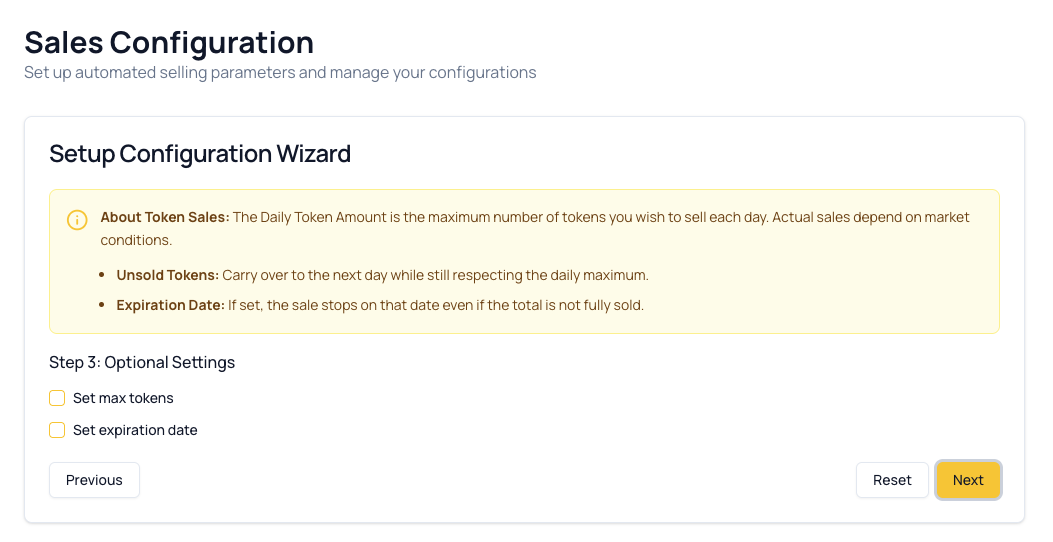
Option A: Maximum Total Tokens
Purpose: Limit the total amount of tokens to sell across all days.
When to Use:
- You want to sell a specific total amount
- Prevent over-selling beyond your target
- Automatic stop when goal is reached
Example Scenario:
You have: 50,000 USDT
You want to sell: Only 30,000 USDT (keep 20,000)

Configuration:
Daily Amount: 1,000 USDT
Max Token Limit: 30,000 USDT

Result:
Day 1-29: Sells 1,000 USDT each day
Day 30: Sells remaining 1,000 USDT (total = 30,000)
Day 31 onwards: STOPS automatically (status = "completed")
Remaining: 20,000 USDT stays in your portfolio
How It Works:
Day 1:  Sold 1,000  | Remaining limit: 29,000
Day 2:  Sold 1,000  | Remaining limit: 28,000
Day 3:  Sold 1,000  | Remaining limit: 27,000
...
Day 29: Sold 1,000  | Remaining limit: 1,000
Day 30: Sold 1,000  | Remaining limit: 0
Day 31: STOPS - Max limit reached ✓
[!TIP] If you don’t set a max limit, sales continue until you manually stop the configuration or it expires.
Option B: Expiration Date
Purpose: Automatically stop sales on a specific date.
When to Use:
- You want to sell for a fixed time period
- You have a deadline for liquidation
- You want time-based automation
Example Scenario:
You want to sell for: 1 month (30 days)

Configuration:
Daily Amount: 1,000 USDT
Expiration Date: March 31, 2025

Result:
March 1-30: Sells 1,000 USDT daily
March 31: Last day, sells 1,000 USDT
April 1: STOPS automatically (status = "expired")
Total Sold: ~30,000 USDT (30 days × 1,000)
Important Notes:
- Expiration date must be in the future
- Earliest date: Tomorrow
- Platform suggests tomorrow’s date by default
Combining Both Limits
You can use BOTH max token limit and expiration date together!
Example:
Daily Amount: 1,000 USDT
Max Token Limit: 20,000 USDT
Expiration Date: April 30, 2025

Whichever comes first STOPS the sales:
- If 20,000 USDT is sold before April 30 → Stops (max limit)
- If April 30 arrives before 20,000 sold → Stops (expiration)
Real Scenario:
Configuration:
- Daily: 1,000 USDT
- Max: 20,000 USDT
- Expires: April 30 (60 days away)

What Happens:
Day 1-19: Sells 1,000 USDT daily = 19,000 total
Day 20: Sells 1,000 USDT = 20,000 total
Day 21: STOPS - Max limit reached (even though 40 days remain until expiration)

Result: Status changes to "completed"
[!NOTE] Using both limits provides double safety - stops when either condition is met.
Step 4: Review and Confirm
What You’ll See:
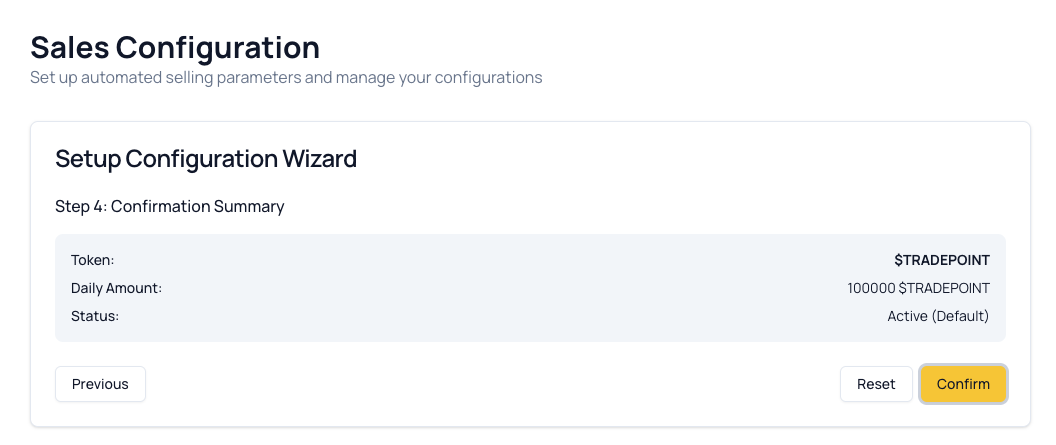
Review Checklist:
Before clicking “Save Configuration,” verify:
- Correct token selected
- Daily amount is what you intended
- Max limit (if set) is correct
- Expiration date (if set) is correct
- Available balance is sufficient
- You understand sales start immediately after activation
Estimated Duration:
- The platform calculates approximately how long sales will run
- Based on your daily amount and limits
- This is an estimate - actual duration may vary
Example Calculation:
Max Token Limit: 30,000 USDT
Daily Amount: 1,000 USDT

Estimated Duration = 30,000 ÷ 1,000 = 30 days
Saving the Configuration
- Click “Save Configuration” button
- A summary dialog appears
Confirmation Dialog:
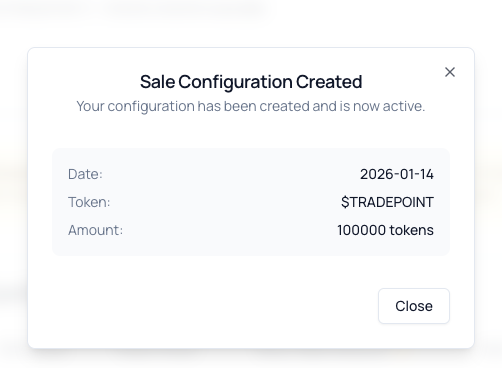
What Happens Next:
- Your configuration appears in the “Active Configurations” table
- Sales processing begins next business day
- Tokens are sold daily until stopped, expired, or completed
6. Managing Active Configurations
After creating a configuration, you can manage it from the Active Configurations table.
Viewing Your Configurations
Location: Bottom of the Sales Config page, under “Active Configurations”
Table Columns:
| Column | What It Shows | Example |
|---|---|---|
| Actions | Start/Stop/Remove buttons | ▶️ Stop Delete |
| Start Date | When configuration was created | 2025-03-01 |
| Token Ticker | Token symbol | USDT |
| Daily Token Amount | Amount to sell per day | 1,000.00 |
| Max Token | Total limit (if set) | 30,000.00 or — |
| Expiration Date | End date (if set) | 2025-03-31 or — |
| Status | Current state | Active, Stopped, etc. |
Configuration Actions
Depending on the status, you’ll see different action buttons.
For “Stopped” Configurations:
Available Actions:
- ▶️ Start - Activates the configuration
- 🗑️ Remove - Deletes the configuration permanently
Example:
Status: Stopped

Actions Menu:
├─ ▶️ Start
└─ 🗑️ Remove
When to Start:
- You created config with “Activate Later”
- You previously stopped sales and want to resume
- You’re ready to begin automated selling
When to Remove:
- You no longer want this configuration
- You want to create a new configuration for this token
- Sales are complete or no longer needed
For “Active” Configurations:
Available Actions:
- ⏸️ Stop - Pauses the configuration
Example:
Status: Active

Actions Menu:
└─ ⏸️ Stop
When to Stop:
- Market conditions changed and you want to pause
- You need time to reassess your strategy
- You want to adjust the daily amount (requires removing and recreating)
[!IMPORTANT] You cannot edit an active configuration. To change daily amount or limits:
- Stop the configuration
- Remove it
- Create a new configuration with desired settings
For “Expired” or “Completed” Configurations:
Available Actions:
- None (actions menu is disabled)
Example:
Status: Expired

Actions: [Disabled]
Why No Actions?
- Configuration has finished its lifecycle
- Cannot be reactivated
- Kept for historical record only
To Resume Sales:
- Create a new configuration
- Use the same token and settings if desired
Starting a Configuration
Steps:
- Find the stopped configuration in the table
- Click the actions menu (three dots ⋮)
- Click “Start”
- Configuration status changes to “Active”
- Sales begin next day after cut-off time
Confirmation:
✓ Configuration started successfully
Sales will begin processing tomorrow.
Stopping a Configuration
Steps:
- Find the active configuration in the table
- Click the actions menu (three dots ⋮)
- Click “Stop”
- Configuration status changes to “Stopped”
- No more sales will be processed

What Happens:
- Current day’s sales complete if already processing
- Future days are skipped
- Your remaining tokens stay in your portfolio
- Configuration remains in the table for future activation
Removing a Configuration
Steps:
- Stop the configuration first (if active)
- Click the actions menu (three dots ⋮)
- Click “Remove”
- Confirm deletion in the popup dialog
Confirmation Dialog:
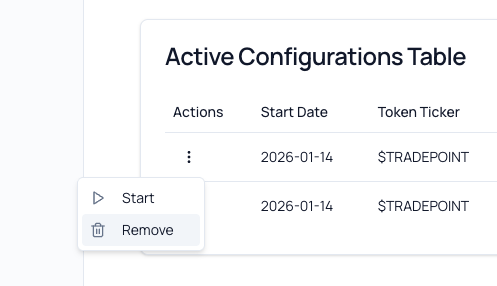
After Removal:
- Configuration is deleted from the table
- Token becomes available for new configuration
- You can create a new configuration for this token
[!CAUTION] Removal is Permanent: Once removed, you cannot restore the configuration. You’ll need to create a new one with the same settings if you want to resume sales.
7. Configuration Status Explained
Each configuration has a status that indicates its current state.
Status Badges
Active 🟢 (Green Badge)
- Meaning: Configuration is running and processing sales daily
- What’s Happening: Platform attempts to sell your daily amount each day
- Your Tokens: Being sold gradually according to schedule
- Actions Available: Stop
- Next Step: Monitor sales history and execution
Stopped 🟡 (Yellow Badge)
- Meaning: Configuration exists but is not processing sales
- What’s Happening: No sales are occurring
- Your Tokens: Remain in your portfolio
- Actions Available: Start, Remove
- Next Step: Start to resume sales or Remove to delete
Expired ⚪ (Gray Badge)
- Meaning: Configuration reached its expiration date
- What’s Happening: Sales have stopped automatically
- Your Tokens: No more sales will occur; remaining tokens stay in portfolio
- Actions Available: None (disabled)
- Next Step: Create new configuration if you want to continue selling
Completed ✅ (Blue Badge)
- Meaning: Configuration reached its max token limit
- What’s Happening: Target amount has been fully sold
- Your Tokens: All intended tokens have been sold
- Actions Available: None (disabled)
- Next Step: No action needed; goal achieved
Canceled ❌ (Red Badge)
- Meaning: Configuration was cancelled by admin or system
- What’s Happening: Sales have been terminated
- Your Tokens: No more sales; remaining tokens in portfolio
- Actions Available: None (disabled)
- Next Step: Contact admin if unexpected; create new config if desired
What Each Status Means for Your Tokens
| Status | Sales Processing? | Can Restart? | Tokens Still Selling? |
|---|---|---|---|
| Active | ✅ Yes | N/A (already active) | ✅ Yes, daily |
| Stopped | ❌ No | ✅ Yes | ❌ No |
| Expired | ❌ No | ❌ No (create new) | ❌ No |
| Completed | ❌ No | ❌ No (goal achieved) | ❌ No |
| Canceled | ❌ No | ❌ No (create new) | ❌ No |
8. Daily Cut-Off Time
What is Cut-Off Time?
The daily cut-off time is the deadline each day by which the platform processes all active sales configurations.
How It Works:
┌────────────────────────────────────────────────────────────────┐
│                                                                │
│  Every Day:                                                    │
│                                                                │
│  Before Cut-Off (e.g., 10:00 AM UTC)                           │
│  └─ Platform collects all active configurations                │
│                                                                │
│  At Cut-Off (10:00 AM UTC)                                     │
│  └─ Sales processing begins                                    │
│                                                                │
│  After Cut-Off (Morning/Afternoon)                             │
│  └─ Sales are executed, tokens sold                            │
│                                                                │
│  Results                                                       │
│  └─ Sales history updated with execution details               │
│                                                                │
└────────────────────────────────────────────────────────────────┘
Where to Find Cut-Off Time
Location: Top of the Sales Config page, in an info card.
Example Display:
┌─────────────────────────────────────────┐
│  Daily Cut-Off Time: 10:00 AM UTC       │
│                                         │
│  Configurations must be active before   │
│  this time to be included in today's    │
│  sales processing.                      │
└─────────────────────────────────────────┘
[!NOTE] Cut-off time is set by platform administrators and may vary. Always check the displayed time on your Sales Config page.
Why Cut-Off Time Matters
For New Configurations:
- If you activate a configuration before cut-off time → Sales begin today
- If you activate a configuration after cut-off time → Sales begin tomorrow
Example:
Cut-Off Time: 10:00 AM UTC

Scenario A:
You activate at 09:30 AM UTC (before cut-off)
→ Sales included in today's processing
→ Tokens sold today

Scenario B:
You activate at 11:00 AM UTC (after cut-off)
→ Too late for today
→ Sales begin tomorrow
For Stopping Configurations:
- If you stop a configuration before cut-off time → Today’s sales may still process
- If you stop a configuration after cut-off time → Today’s sales likely already processed
[!TIP] Plan Ahead: If you want sales to begin on a specific day, activate your configuration before the cut-off time on that day.
Time Zone Considerations
Platform Uses UTC:
- All cut-off times are in Coordinated Universal Time (UTC)
- Convert to your local timezone to plan accordingly
Example Conversions:
Cut-Off: 10:00 AM UTC

Local Times:
- Los Angeles (PST): 2:00 AM
- New York (EST): 5:00 AM
- London (GMT): 10:00 AM
- Paris (CET): 11:00 AM
- Tokyo (JST): 7:00 PM
- Sydney (AEDT): 9:00 PM
Use Online Tools:
- Google: “10 AM UTC to my timezone”
- World Clock websites
- Timezone converter apps
9. Understanding Sales Execution
How Sales Are Processed
Daily Process:
1. Collection Phase (Before Cut-Off)
   └─ Platform collects all active configurations
   └─ Identifies tokens to sell and amounts

2. Execution Phase (At/After Cut-Off)
   └─ Platform executes sales operations
   └─ Sells tokens according to configured amounts
   └─ Prices determined by market conditions

3. Recording Phase (After Execution)
   └─ Sales recorded in database
   └─ Your balance updated
   └─ History updated with execution details

4. Result (Your Dashboard)
   └─ See executed sales in Sales History
   └─ View updated token balances
   └─ Track progress toward goals
Actual vs. Target Sales
Target Amount:
- The daily amount you configured
- What you want to sell
- Your instruction to the platform
Executed Amount:
- The actual amount sold
- What was successfully sold
- May differ from target
Why They May Differ:
Market Conditions
- Low liquidity: Not enough buyers
- Price volatility: Unfavorable prices
- Platform may partially execute to get better prices
Platform Constraints
- Operational limitations
- Risk management policies
- Execution windows
Your Balance
- If your available balance drops below daily amount
- Previous sales reduced available tokens
- New locks or restrictions applied
Example:
Day 1:
Target: 1,000 USDT
Executed: 1,000 USDT
Result: ✓ Full execution

Day 2:
Target: 1,000 USDT
Executed: 750 USDT
Result: ⚠️ Partial execution (market conditions)

Day 3:
Target: 1,000 USDT
Executed: 1,000 USDT
Result: ✓ Full execution
[!IMPORTANT] Sales Are Best-Effort: The platform attempts to sell your target amount but does not guarantee full execution every day. This protects you from unfavorable market conditions.
What Happens to Sale Proceeds
Where Money Goes:
- Sale proceeds are added to your platform balance
- Typically credited same day or next business day
- Shows in your portfolio as available funds
Example Flow:
Before Sale:
├─ USDT Balance: 50,000
└─ USD Balance: $0

After Sale (1,000 USDT sold at $1.00):
├─ USDT Balance: 49,000 (reduced by 1,000)
└─ USD Balance: $1,000 (proceeds added)

You can then:
├─ Withdraw USD to bank
├─ Use USD to buy other tokens
└─ Keep USD in platform balance
[!NOTE] Specific proceeds handling may vary by platform. Check with your admin team for details on how sale proceeds are credited to your account.
10. Frequently Asked Questions
General Questions
Q: Can I have multiple sales configurations for the same token? A: No. Only one configuration per token is allowed. To change settings, stop/remove the existing config and create a new one.
Q: Can I configure sales for multiple different tokens? A: Yes! You can have one active configuration per token. For example, one for USDT and one for ETH simultaneously.
Q: Do sales happen on weekends? A: This depends on platform operations. Check with your admin team. Some platforms process daily including weekends; others skip weekends.
Q: What happens to tokens I haven’t sold yet? A: They remain in your portfolio. You can use them for other purposes, withdraw them, or continue selling with a new configuration later.
Q: Is there a fee for using sales configuration? A: Platform policies vary. Some charge trading fees, others don’t. Check with your admin team for fee structures.
Configuration Questions
Q: Can I change the daily amount after creating the configuration? A: No. To change the daily amount, you must:
- Stop the configuration
- Remove it
- Create a new configuration with the desired amount
Q: What if I set a daily amount higher than my available balance? A: The platform will attempt to sell up to your available balance. For example, if you configure 1,000 USDT daily but only have 500 USDT, it will sell 500 USDT and the configuration status may change to “completed.”
Q: Can I set a max token limit higher than my available balance? A: Yes, but sales will stop when your available balance reaches zero, even if the max limit hasn’t been reached.
Q: What happens if both expiration date and max limit are reached on the same day? A: Status changes based on which condition is met first during processing. Functionally, both result in sales stopping, so the distinction is for record-keeping only.
Execution Questions
Q: What price will my tokens be sold at? A: The platform determines execution price based on market conditions at the time of sale. You do not set or control the price.
Q: Why was my daily amount not fully executed? A: Common reasons:
- Market liquidity constraints
- Unfavorable prices (platform protects you from bad prices)
- Your available balance decreased below the target
- Operational constraints
Q: Can I see the price at which tokens were sold? A: Yes, check your sales history. It shows executed quantity, executed price, and total proceeds for each sale.
Q: What if a sale fails completely? A: If a sale cannot execute on a given day, it’s skipped for that day. The platform will attempt again the next day if the configuration is still active.
Status Questions
Q: My configuration status is “stopped” but I never stopped it. Why? A: This typically happens if:
- You created the config with “Activate Later” option
- An admin action paused your configuration
- System error occurred (contact support)
Q: Can I reactivate an “expired” configuration? A: No. Expired configurations cannot be reactivated. Create a new configuration if you want to resume sales.
Q: What’s the difference between “completed” and “expired”? A:
- Completed: Max token limit was reached (sales goal achieved)
- Expired: Expiration date was reached (time limit reached)
Q: My status shows “canceled.” What does that mean? A: Your configuration was cancelled by an administrator or system. Contact admin team for details and to understand the reason.
Troubleshooting Questions
Q: I activated my configuration but don’t see any sales. Why? A: Check:
- Did you activate after cut-off time? (Sales begin tomorrow)
- Is your configuration status “Active”? (Not “Stopped”)
- Has at least one business day passed since activation?
- Do you have sufficient available token balance?
Q: Can I cancel a sale that’s currently processing? A: Generally no. Once daily processing begins (after cut-off time), that day’s sales will complete. You can stop the configuration to prevent future days’ sales.
Q: I removed a configuration by mistake. Can I restore it? A: No. Removal is permanent. You’ll need to create a new configuration with the same settings.
11. Troubleshooting
Issue: Cannot Create New Configuration - “Already Exists” Error
Symptoms:
- Try to create configuration but get error
- Message: “Configuration already exists for this token”
- Cannot select token in wizard
Cause:
- You already have an active or stopped configuration for this token
- Only one configuration per token is allowed
Solutions:
- Check Active Configurations Table:
- Scroll down to “Active Configurations”
- Look for existing config for this token
- Note its current status
- If Status is “Stopped”:
- Click actions menu (three dots)
- Click “Remove”
- Confirm deletion
- Try creating new configuration
- If Status is “Active”:
- Click actions menu
- Click “Stop”
- Then click “Remove”
- Try creating new configuration
- If Status is “Expired” or “Completed”:
- These shouldn’t block new configs
- Refresh the page
- Try again
- Contact support if issue persists
Issue: Sales Not Processing Despite Active Configuration
Symptoms:
- Configuration status shows “Active”
- Multiple days have passed
- No sales appear in history
- Token balance hasn’t decreased
Solutions:
- Check Configuration Details:
- Verify daily amount is above minimum
- Confirm available balance is sufficient
- Check if max limit or expiration was already reached
- Verify Activation Time:
- When did you activate?
- Was it before or after cut-off time?
- If after cut-off, sales begin next day
- Check Available Balance:
- Go to Portfolio page
- Verify token is still available (not all locked)
- Ensure balance is above your daily amount
- Review Sales History:
- Check Portfolio or Sales Summary page
- Look for any partial executions
- Sales may be occurring but at lower amounts
- Wait for Processing:
- Sales process once daily after cut-off
- Allow at least one full business day
- Check again after next cut-off time
- Contact Support:
- If no sales after 3 business days
- Provide:
- Configuration details
- Activation date and time
- Token and daily amount
- Screenshots of config and balance
Issue: Partial Executions (Less Than Daily Amount)
Symptoms:
- Sales are happening but amounts are low
- Executed amount < Target amount
- History shows consistent partial fills
Understanding: This is often normal behavior due to market conditions.
Common Reasons:
1. Market Liquidity
- Not enough buyers at desired price levels
- Platform waits for better conditions
- Protects you from unfavorable prices
2. Platform Risk Management
- Conservative execution to avoid slippage
- Spreads large orders across multiple prices
- Ensures fair pricing
3. Decreasing Available Balance
- Your balance is reducing daily from sales
- Eventually drops below daily target amount
- Last few days will be partial
Solutions:
- Accept Partial Executions:
- This is protective behavior
- Better than selling at bad prices
- Sales will eventually complete
- Adjust Configuration:
- If consistently getting 50% execution
- Stop and remove current config
- Create new config with lower daily amount
- Example: If target 1,000 but getting 500, set target to 600
- Extend Time Period:
- Increase expiration date (requires recreating config)
- Or remove max limit
- Allows more time for full sales
- Monitor and Wait:
- Market conditions change
- Full executions may resume
- Check history over a week before adjusting
Issue: Configuration Stuck in “Stopped” Status
Symptoms:
- You clicked “Start” but status remains “Stopped”
- Configuration won’t activate
- Refresh doesn’t change status
Solutions:
- Refresh the Page:
- Hard refresh:
Ctrl+F5(Windows) /Cmd+Shift+R(Mac) - Check status again
- Hard refresh:
- Try Starting Again:
- Click actions menu
- Click “Start”
- Wait 5-10 seconds
- Refresh page
- Check Browser Console:
- Press
F12to open developer tools - Look for error messages in Console tab
- Screenshot and send to support if errors present
- Press
- Try Different Browser:
- Use Chrome, Firefox, or Safari
- Clear cache and cookies
- Log in and try starting again
- Check Account Status:
- Ensure you have permissions
- Account may have restrictions
- Contact admin team
- Remove and Recreate:
- If stuck after multiple attempts
- Remove the configuration
- Create a new configuration
- Activate immediately
Issue: Token Not Showing in Dropdown (Step 1)
Symptoms:
- Cannot find token in selection dropdown
- Dropdown shows “No token available”
- Token shows in your portfolio but not in wizard
Causes & Solutions:
Cause 1: Existing Configuration
- Token already has an active or stopped configuration
- Solution: Remove existing config first
Cause 2: No Available Balance
- All tokens are locked, vesting, or reserved
- Solution: Wait for tokens to become available or use different token
Cause 3: Below Minimum Amount
- Available balance is below token’s minimum trading amount
- Solution: Accumulate more tokens or use different token
Cause 4: Token Not Suitable for Trading
- Platform may restrict certain tokens from sales config
- Solution: Check with admin team about token eligibility
Issue: Daily Amount Input Not Accepting Decimals
Symptoms:
- Can only enter whole numbers
- Decimals are automatically removed
- Cannot enter values like 1,500.50
Cause:
- Token has zero decimal places (rare)
- Browser or input validation issue
Solutions:
- Check Token Decimals:
- Some tokens only support whole numbers
- USDT typically supports 2-6 decimals
- Verify token specifications
- Use Correct Format:
- Use period (.) not comma (,) for decimal
- Example:
1500.50not1500,50
- Clear and Re-enter:
- Delete all text
- Type decimal value fresh
- Example: Type
1000.25
- Try Different Browser:
- Some browsers have input quirks
- Try Chrome, Firefox, or Edge
Issue: Cannot Remove Configuration
Symptoms:
- Click “Remove” but nothing happens
- Configuration remains in table
- No error message displayed
Solutions:
- Stop Configuration First:
- If status is “Active,” stop it
- Then try removing
- Active configs may require stopping first
- Check Configuration Status:
- “Expired” and “Completed” configs cannot be removed
- They’re kept for historical record
- This is normal behavior
- Wait and Retry:
- Wait 10-15 seconds after clicking
- Refresh the page
- Try removing again
- Check for Pending Operations:
- If sales are currently processing
- Configuration may be locked
- Try after next business day
- Contact Admin:
- If configuration has special restrictions
- Admin team can manually remove
- Provide configuration ID and token
Issue: Cut-Off Time Shows “N/A”
Symptoms:
- Cut-off time displays as “N/A”
- Cannot determine when sales process
- Info card is empty or shows error
Solutions:
- Refresh the Page:
- Cut-off time is fetched from API
- Refresh to retry fetching
- Hard refresh:
Ctrl+F5/Cmd+Shift+R
- Check Internet Connection:
- Ensure stable connection
- API call may have failed
- Retry after connection is restored
- Contact Admin Team:
- Cut-off time may not be configured
- Admin team needs to set system setting
- Ask for cut-off time information
- Assume Standard Time:
- Many platforms use 10:00 AM UTC
- Proceed with caution
- Verify with support before relying on assumption
Need More Help?
If you’re still experiencing issues after trying the troubleshooting steps:
- Check the platform documentation for any recent updates or changes
- Contact support with:
- Clear description of the issue
- Configuration details (token, daily amount, status)
- Steps you’ve already tried
- Screenshots of the problem
- Date and time when issue occurred
When Contacting Support About Sales Config, Provide:
- Configuration ID (if visible)
- Token symbol and daily amount
- Current status of configuration
- Activation date/time
- Any error messages (exact wording)
- Screenshots of configuration table and wizard
- Your available token balance
Summary Checklist
Before creating a sales configuration:
- Understand sales are automated but not guaranteed
- Check available token balance is sufficient
- Verify no existing configuration for this token
- Know the daily cut-off time for your timezone
- Decide on daily amount based on your goals
- Consider setting max limit if you have a total target
- Consider setting expiration if you have a time limit
- Review all settings carefully before saving
- Understand activation timing relative to cut-off time
- Know how to monitor sales execution and history
Quick Reference:
- Purpose: Automate daily token sales
- Limit: One configuration per token
- Execution: Once daily after cut-off time
- Status: Active, Stopped, Expired, Completed, Canceled
- Actions: Start, Stop, Remove (depending on status)
- Guarantee: Best-effort, not guaranteed full execution
- Flexibility: Can start/stop anytime
This guide is maintained by the TradePoint team. Last updated: January 2025